Published: December 2025 | Reading time: 8 minutes | Author: AutoKeyz
You’ve just had your Discovery Sport jump-started after a flat battery. The engine’s running, the dashboard looks normal — but now neither key fob will lock or unlock the car. Press the buttons and nothing happens. You’re not alone, and you’re not imagining it.
This is one of the most common issues we deal with at AutoKeyz. After a flat battery, disconnection, or jump start, Discovery Sport key fobs frequently lose synchronisation with the vehicle. The good news? There are several DIY fixes you can try. The better news? If those don’t work, we can usually resolve it the same day without a lengthy dealer wait.
This guide covers why this happens, what you can try at home, and when it’s time to call in a JLR specialist.
Why Key Fobs Stop Working After a Flat Battery
Your Discovery Sport uses a sophisticated keyless entry system that relies on constant communication between your key fobs and the vehicle’s RFA (Remote Function Actuator) module. When the car battery goes flat or gets disconnected, several things can go wrong.
Loss of synchronisation is the most common cause. The RFA module and key fobs communicate using encrypted rolling codes. When power is interrupted, this synchronisation can be lost. Your key fob is still transmitting, but the car no longer recognises the signal as valid.
Module reset states also play a role. Modern Land Rovers have multiple electronic control modules that need to “wake up” in a specific sequence. A flat battery or improper jump start can leave modules in an incorrect state, preventing normal keyless operation.
Corrupted memory is less common but more serious. In some cases, particularly with older Discovery Sports (2015-2017), the security module can lose stored key data during a power interruption. This requires professional reprogramming.
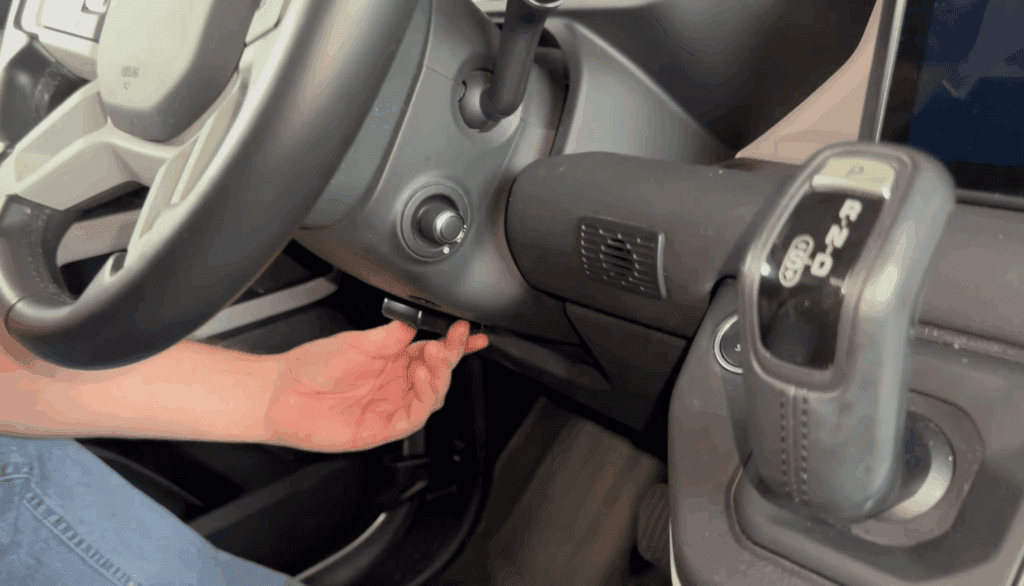
The symptoms are usually consistent: both key fobs stop locking and unlocking the doors remotely, but the car may still start if you hold the fob against the emergency start location under the steering column. If keyless entry (touching the door handles) also stops working, the issue is definitely communication-related rather than just a dead fob battery.
Before You Try Anything Else: Check the Basics
Before attempting any reset procedures, rule out the obvious causes.
Check your key fob batteries. Yes, even if they were fine yesterday. A flat car battery means the key fobs haven’t been communicating with the vehicle, and you may not have noticed they were already weak. Discovery Sport key fobs use CR2032 batteries. Replace them with fresh, branded batteries from Duracell or Panasonic — avoid cheap unbranded cells from market stalls.
When replacing the battery, make sure to remove any plastic safety tab that might be stuck to the new battery. We’ve seen countless cases where owners replace the battery but leave the protective sticker on the negative side.
Verify the car battery is properly charged. A battery that’s been jump-started needs time to recharge. If the car battery voltage is still low, the keyless system may not function correctly. Let the engine run for at least 30 minutes, or ideally take it for a longer drive. Alternatively, put the battery on a proper charger overnight.
Test with your spare key. If you have a spare key fob that’s been sitting in a drawer, try it. If neither key works, the problem is almost certainly with the car rather than the fobs themselves.
DIY Fix 1: The Battery Disconnect Reset
This is the most effective DIY fix and works in roughly 60-70% of cases.
The principle is simple: completely cutting power to the vehicle forces all modules to reset and re-establish communication when power is restored.
Step 1: Turn off the ignition and remove the key fob from the vehicle.
Step 2: Open the bonnet and locate the battery. On Discovery Sports, it’s in the engine bay on the right side.
Step 3: Disconnect the negative (black) terminal first, then the positive (red) terminal.
Step 4: With both terminals disconnected, touch the two cable ends together for 30-60 seconds. This drains any residual charge from the vehicle’s capacitors and ensures a complete reset.
Step 5: Wait 15 minutes. This allows all modules to fully power down.
Step 6: Reconnect the battery — positive terminal first, then negative.
Step 7: Sit in the driver’s seat with a key fob, close all doors, and press the start button (without pressing the brake) to wake the system.
Step 8: Test your key fob by pressing the lock button. You should hear the locks cycle.
Important: After this reset, you’ll need to re-initialise your windows (hold each window switch down then up for a few seconds to restore one-touch operation) and reset the clock.
DIY Fix 2: The Key Fob Resync Procedure
If the battery disconnect doesn’t work, try manually resyncing the key fobs. This procedure varies slightly between Discovery Sport model years, but the following works for most L550 models (2015-2024).
Method A — Emergency Key Resync:
- Use the emergency blade key (hidden inside your fob) to manually unlock the driver’s door
- Within 10 seconds of unlocking, press the unlock button on your key fob
- The car should recognise the fob and resync
This method has been confirmed to work by several Discovery Sport owners on UK forums.
Method B — Ignition Cycle Resync:
- Enter the vehicle and close all doors
- Insert the emergency key blade into the ignition (if your model has one) or place the fob in the emergency start position under the steering column
- Turn the ignition to position II (or press start without brake) and back to off within 5 seconds
- Repeat this 5 times quickly
- After the fifth cycle, press the lock button on your key fob within 10 seconds
- You should hear a beep or see the indicators flash, confirming the resync
Method C — Lock/Unlock Button Sequence:
- Stand near the vehicle with your key fob
- Press the unlock button, then the lock button
- Repeat this sequence 5 times (unlock-lock, unlock-lock, unlock-lock, unlock-lock, unlock-lock)
- The doors should cycle, confirming synchronisation
These methods don’t work for everyone, particularly on newer models with more advanced encryption. If none of these work, you’ll need diagnostic equipment.
DIY Fix 3: Check the RFA Module Fuse
A blown fuse can prevent the keyless system from functioning even if everything else is fine.
In the Discovery Sport, the fuse box is located in the engine bay (main fuse box) and behind the glovebox (interior fuse box). The RFA module fuse is typically in the interior fuse box.
Consult your owner’s manual for the exact fuse location — it varies by model year. The fuse is usually a 5A or 10A mini fuse.
If the fuse has blown, replace it with one of the same rating. However, a blown fuse often indicates an underlying problem, so if it blows again, don’t keep replacing it — get the system checked properly.
When DIY Fixes Won’t Work
If you’ve tried all the above and your key fobs still won’t work, you’re likely dealing with one of these issues.
Key data corruption occurs when the security module loses its stored key information. The car literally doesn’t know your keys exist anymore. This requires a key relearn procedure using JLR diagnostic software (SDD or Pathfinder).
RFA module failure is more common on Discovery Sports that have had water ingress issues. The RFA module is located in the rear of the vehicle and can be affected by boot seal leaks. Symptoms include intermittent keyless operation or complete failure.
BCM (Body Control Module) issues are rarer but can occur after significant power events. The BCM manages many vehicle functions including the keyless entry system.
In all these cases, you need access to dealer-level diagnostic equipment. A generic OBD2 scanner won’t cut it — JLR vehicles require specific software to access the security systems.
What a Professional Can Do That You Can’t
When you bring your Discovery Sport to AutoKeyz, here’s what we can do that DIY methods can’t.
Full diagnostic scan using JLR SDD/Pathfinder software. This reads fault codes from all modules and identifies exactly what’s gone wrong. Often there are stored codes pointing to the specific cause.
Key relearn procedure. If your keys have lost synchronisation at the security level (not just the RF level), we can run a full key relearn. This re-registers your existing keys to the vehicle without needing new ones.
Module programming and configuration. If a module has lost its configuration or needs a software update, we can flash it with the latest Land Rover software.
New key programming. If your keys are damaged or you’ve lost one, we can supply and program genuine or OEM-quality replacement keys on the spot.
The advantage of using a mobile specialist like AutoKeyz is that we come to you. No need to arrange towing to a dealer, no waiting weeks for an appointment, and typically 50-60% less than dealer prices.
How Much Does Professional Key Resync Cost?
For Discovery Sport key synchronisation and diagnostics, here’s what you can typically expect.
Key resync/relearn only: £75-150 — This assumes the keys are fine and just need re-registering to the vehicle.
Diagnostics and resync: £100-200 — Includes full diagnostic scan to identify any underlying issues plus the resync.
New key supply and programming: £200-350 — If you need a replacement key fob supplied and programmed to the vehicle.
All keys lost situation: £400-700 — When you have no working keys and we need to supply two new keys and program from scratch.
Compare this to Land Rover dealers who typically charge £150+ per hour for diagnostics alone, plus several hundred for each new key, and wait times of 1-4 weeks for appointments.
Preventing Future Key Fob Problems
Once you’ve got your key fobs working again, a few simple practices can prevent future issues.
Don’t ignore low battery warnings. When your Discovery Sport displays a key fob battery warning, replace it promptly. A weak fob battery can cause intermittent issues that are harder to diagnose.
Keep a spare key active. Don’t leave your spare key in a drawer for years. Use it occasionally to keep the battery from going completely flat and to ensure it stays synced.
Maintain your car battery. If you don’t drive frequently, consider a battery maintainer/conditioner. A healthy 12V battery prevents the cascade of problems that start with a flat battery.
Be careful with jump starts. Always connect jump leads correctly (positive to positive, negative to a ground point — not the negative terminal). Incorrect jump starting can cause voltage spikes that damage sensitive modules.
Address water ingress promptly. Discovery Sports are known for boot seal and sunroof drain issues. If you notice dampness in the boot or headlining, get it sorted before it affects the electronics.
Still Stuck? We Can Help
If your Discovery Sport key fobs have stopped working after a flat battery and the DIY fixes haven’t helped, AutoKeyz offers same-day mobile service across Kent, London, Essex, East Sussex, Berkshire, Hampshire, and Buckinghamshire.
We specialise exclusively in Jaguar and Land Rover vehicles, carrying dealer-level diagnostic equipment and genuine keys in our vans. Most key synchronisation issues can be resolved within an hour at your location.
Call us on 07769 017971 — we’re available 7 days a week and can usually attend same-day or next-day.
Whether you need a simple resync, full diagnostics, or replacement keys, we’ll get your Discovery Sport back to normal without the dealer wait or dealer prices.
Frequently Asked Questions
Can I resync my Discovery Sport key fob myself?
Sometimes, yes. The DIY methods in this guide work for many owners, particularly the battery disconnect reset and the emergency key resync procedure. However, if the keys have lost synchronisation at the security module level, you’ll need professional diagnostic equipment.
Why did both my key fobs stop working at the same time?
Because the problem isn’t with the fobs — it’s with the car. When the vehicle’s RFA module or security system loses communication after a flat battery, it affects all keys equally. This actually confirms the fobs themselves are fine.
My Discovery Sport starts with the key held under the steering column but won’t lock/unlock remotely. Why?
The emergency start location uses a different (passive) communication method than the remote locking. The fact that it works there confirms your key’s transponder is fine, but the RF (radio frequency) communication has been lost. This is exactly what the resync procedures are designed to fix.
Will disconnecting the battery again make things worse?
No. In fact, a clean battery disconnect is often part of the solution. The key is to do it properly — disconnect both terminals, drain residual power, wait 15 minutes, then reconnect correctly.
How long do Discovery Sport key fob batteries last?
Typically 2-4 years depending on usage. If you use keyless entry frequently (touching the door handles rather than pressing buttons), the fob works harder and batteries drain faster.
Related Articles
JLR Key Fob Battery — Which Type and How to Replace
Range Rover Evoque Smart Key Not Detected — Causes & Fixes