Published: December 2025 | Reading time: 7 minutes | Author: AutoKeyz
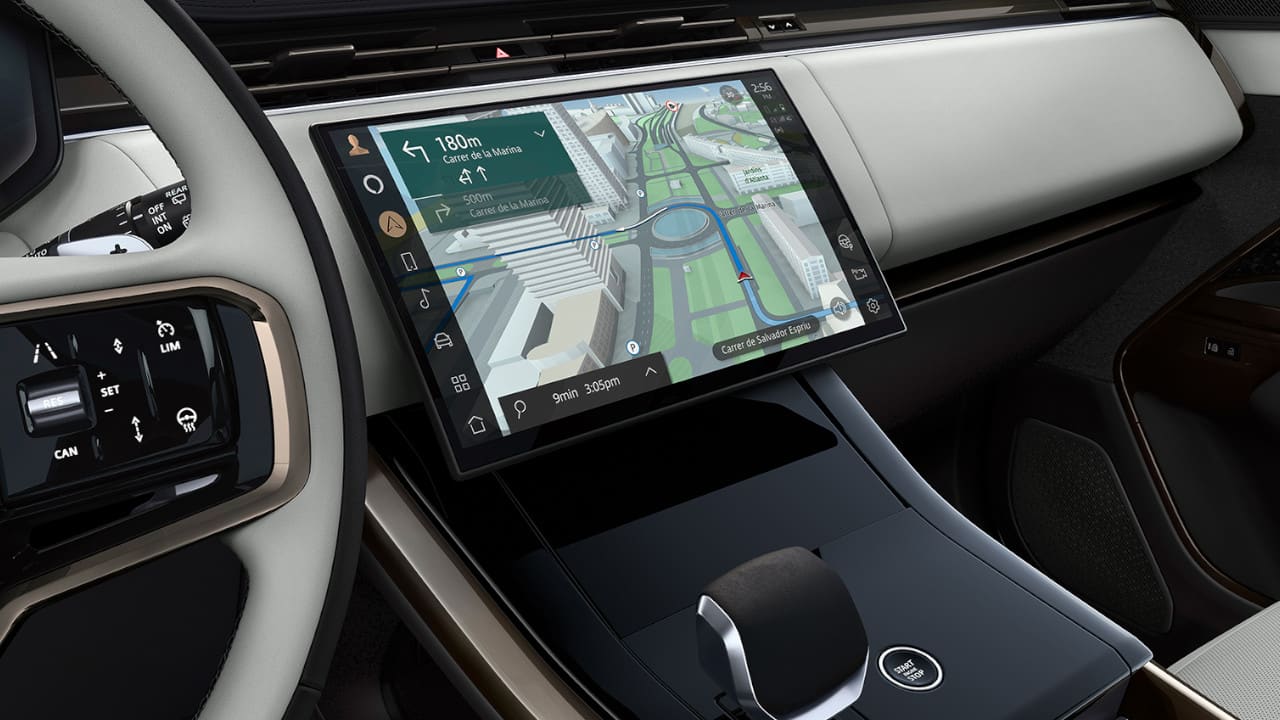
Your Pivi Pro touchscreen has gone completely black. The instrument cluster works fine, but the main centre screen is dead — no navigation, no climate controls, no reversing camera. You’re not alone. This frustrating glitch is affecting thousands of JLR owners, and it’s been a known issue since the Pivi Pro system launched in 2020.
The good news? There’s a simple fix that works in most cases. This guide covers why it happens, which vehicles are affected, and exactly how to get your screen working again.
What Is the Pivi Pro Black Screen Glitch?
The Pivi Pro black screen issue presents in several ways.
Complete black screen is the most common. The touchscreen goes completely dark with no response to touch inputs. The screen may go black while you’re driving or fail to turn on when you start the vehicle.
Frozen display means the screen shows a static image but won’t respond. You might see the home screen or navigation map, but touching anything does nothing.
Intermittent blackouts happen randomly while driving. The screen cuts out for a few seconds or minutes, sometimes returning on its own, sometimes not.
Partial functionality is particularly annoying. You can still hear the radio or control some features via steering wheel buttons, but the screen itself is black. Some owners report being able to make “blind” selections using muscle memory.
This isn’t just an inconvenience — losing your Pivi Pro screen means losing access to navigation and maps, climate control adjustments, the reversing camera, Apple CarPlay and Android Auto, vehicle settings and drive modes, and phone and media controls.
Which Vehicles Are Affected?
The Pivi Pro black screen glitch affects virtually the entire JLR range equipped with this infotainment system.
Range Rover models include Range Rover (L460) from 2022 onwards, Range Rover Sport (L461) from 2022 onwards, Range Rover Velar from 2021 onwards, and Range Rover Evoque from 2021 onwards.
Land Rover models include Defender 90 and 110 (L663) from 2020 onwards, Discovery from 2021 onwards, and Discovery Sport from 2021 onwards.
Jaguar models include F-Pace from 2021 onwards, E-Pace from 2021 onwards, I-Pace from 2021 onwards, XF from 2021 onwards, and XE from 2021 onwards.
The problem appears more prevalent in 2024 and 2025 model year vehicles, particularly those running recent over-the-air software updates. However, owners of 2021-2023 models have also reported the issue.
Why Does This Happen?
The Pivi Pro system runs on Qualcomm Snapdragon processors with a Blackberry QNX operating system. While this is sophisticated technology, the software has proven buggy since launch.
Software crashes are the primary cause. Like a computer freezing, the infotainment system’s software can crash or hang, leaving the screen unresponsive.
Memory management issues may cause the system to run out of available memory over time, triggering a crash. This explains why some owners experience the problem more frequently after longer drives.
Update conflicts have introduced new bugs. JLR releases frequent over-the-air updates, but some updates have actually made the black screen issue worse for certain owners.
Module communication failures between the ICCM (Infotainment Connectivity Control Module) and the display can cause the screen to go black while the underlying system continues running.
JLR is now on Pivi Pro version 4.3.x (late 2025), but forum reports suggest the problem hasn’t been completely eliminated despite numerous updates.
How to Fix the Pivi Pro Black Screen
Here are the methods to restore your screen, starting with the simplest.
Method 1: Wait and Restart (Most Effective)
If your screen has gone completely black and won’t respond to anything, this is the most reliable fix.
Turn off the engine and remove the key, or exit the vehicle if you have keyless entry. Lock the vehicle using the key fob. Wait 15-20 minutes — this is important, as the system needs time to fully power down. Unlock and restart the vehicle.
Why 20 minutes? Modern JLR vehicles keep many systems active for several minutes after you exit, even with the doors locked. The infotainment module can take 10-15 minutes to fully shut down. Waiting 20 minutes ensures a complete power cycle and clears any stuck processes.
Many owners report this is the only method that works when the screen is completely unresponsive.
Method 2: Hard Reset for Pre-2024 Vehicles
For vehicles manufactured before 2024 that have a physical volume knob, you can perform a hard reset.
Ensure the vehicle is in Park. Press and hold the volume knob (media power button) for 20-30 seconds. Continue holding until the screen goes blank. Wait for the Land Rover or Jaguar logo to appear. The system will reboot and display the welcome screen.
You may need to repeat this process more than once. The reset only works when the vehicle is stationary in Park.
Method 3: Phone Button Reset for 2024+ Vehicles
For 2024 model year and newer vehicles that don’t have a physical volume knob, the reset method is different.
Ensure the vehicle is in Park. Press and hold the phone button on the steering wheel for 15-20 seconds. Continue holding until the touchscreen goes blank. Wait for the manufacturer logo to appear. The system will complete its reboot.
This method was introduced because 2024 model year vehicles removed the central volume knob as part of JLR’s move towards touch-only controls.
Method 4: Quick Lock/Unlock Cycle
A faster method that works for minor glitches.
Turn off the engine. Exit and lock the vehicle. Wait 30 seconds to 1 minute. Unlock the vehicle. Get back in and start the engine.
This can be enough to reset the system if the glitch is temporary. It won’t work for more stubborn cases.
Method 5: Battery Disconnect (Last Resort)
If nothing else works, you can disconnect the vehicle battery.
Open the bonnet. Disconnect the negative battery terminal. Wait 30 minutes. Reconnect the battery.
Warning: This will reset all vehicle settings including radio presets, seat memory positions, and climate preferences. Only use this as a last resort when other methods have failed.
What If the Problem Keeps Happening?
If your Pivi Pro screen repeatedly goes black, here’s what to do.
Check for software updates by going to Settings, then All, then Software Update on your infotainment screen (when it’s working). JLR regularly releases over-the-air updates to address known issues. You can also check the Land Rover or Jaguar software update pages online.
Visit your dealer if the problem persists after multiple resets and software updates. They can force a complete software reinstall to factory defaults, check for technical service bulletins specific to your vehicle, test and potentially replace the ICCM module, and replace the touchscreen unit if hardware failure is suspected.
Some owners have had success after dealers performed a “software rewind” — rolling back to an earlier version, then updating fresh to the latest release.
Document everything if you’re experiencing repeated failures. Record video of the issue occurring, note the date, time and conditions each time it happens, and keep records of all dealer visits. This documentation is essential for warranty claims or, in severe cases, consumer protection.
Prevention Tips
While you can’t completely prevent software glitches, these practices may help reduce occurrences.
Keep software updated and accept OTA updates when prompted. Don’t interrupt updates — let them complete fully before using the vehicle.
Avoid excessive app switching as rapidly changing between apps can stress the system. Close streaming apps like Spotify when not in use.
Perform periodic resets as a preventative measure. Some owners do a hard reset once a month to clear any accumulated issues.
Park in the shade when possible. Some owners report more frequent glitches when the cabin gets extremely hot, as the infotainment system has thermal monitoring that can shut it down in extreme temperatures.
When Is It a Hardware Problem?
The black screen issue is usually software-related, but hardware failure does occur. Signs that suggest hardware failure include the screen never coming back on even after all reset methods, visible physical damage to the screen, the screen displaying distorted colours or lines before going black, error messages on the driver’s display referencing the infotainment system, and the problem occurring immediately after a specific incident like impact or water exposure.
If hardware failure is suspected, the touchscreen or ICCM module may need replacement. This should be covered under warranty for vehicles within the warranty period.
JLR’s Response to the Issue
JLR has acknowledged infotainment issues across their range and settled a class action lawsuit in 2024 regarding InControl Touch Pro systems in older vehicles.
For Pivi Pro specifically, JLR continues releasing software updates addressing connectivity fixes for Apple CarPlay and Android Auto, system stability improvements, and general bug fixes and performance enhancements.
The most recent updates (4.3.x series in 2025) have focused on security, stability, and reversing camera improvements. However, the random black screen issue hasn’t been completely eliminated based on owner forum reports.
Quick Reference: How to Reset Your Pivi Pro Screen
Your screen has gone black. Here’s what to do.
For pre-2024 vehicles with a volume knob, hold the volume knob for 20-30 seconds until the screen reboots with the manufacturer logo.
For 2024+ vehicles without a volume knob, hold the phone button on the steering wheel for 15-20 seconds until the screen reboots.
If the reset doesn’t work, turn off the car, lock it, wait 15-20 minutes, then unlock and restart.
If it keeps happening, check for software updates and book a dealer appointment. Document each occurrence.
Need Help With Your JLR Vehicle?
At AutoKeyz, we’re specialists in Jaguar and Land Rover vehicles across Kent, London, Essex and the South East. While the Pivi Pro black screen is a software issue that typically requires a dealer visit, we can help with all your JLR key and security needs.
Lost your keys? Locked out? Need a spare programmed? We provide same-day mobile service with dealer-level equipment.
Call us on 07769 017971 — we’re available 7 days a week.
Frequently Asked Questions
Why does my Pivi Pro screen keep going black?
The Pivi Pro black screen is typically caused by a software glitch in the infotainment system. The issue is particularly common in 2024 and 2025 model year JLR vehicles and often occurs after software updates.
How do I reset my Pivi Pro screen?
For pre-2024 vehicles, hold the volume knob for 20-30 seconds until the screen reboots. For 2024+ vehicles without a volume knob, hold the phone button on the steering wheel for 15-20 seconds.
What do I do if the Pivi Pro reset doesn’t work?
Turn off the vehicle, lock it, and wait 15-20 minutes before restarting. This allows the infotainment system to fully power down and clear any stuck processes.
Is the Pivi Pro black screen covered under warranty?
Yes, if your vehicle is within the manufacturer’s warranty period, software issues and any required hardware replacements should be covered. Document each occurrence and visit your dealer.
Which vehicles have the Pivi Pro black screen problem?
The issue affects Range Rover, Range Rover Sport, Range Rover Velar, Range Rover Evoque, Defender, Discovery, Discovery Sport, and Jaguar F-Pace, E-Pace, I-Pace, XF and XE models from 2020-2025.
Will a software update fix the black screen problem?
JLR has released multiple updates attempting to fix this issue, with mixed results. Keep your software updated, but be aware that some owners report the problem persisting even on the latest version.
Related Articles
Discovery Sport Key Fob Not Working After Flat Battery — Causes & Fixes
Range Rover Evoque Smart Key Not Detected — Causes & Fixes
JLR Key Fob Battery Replacement Guide — Jaguar & Land Rover
What’s the Difference Between PEPS and UWB Keys?
Pivi Pro Screen Goes Black? How to Fix It — Range Rover, Land Rover & Jaguar (UK Guide 2025)
Published: December 2025 | Reading time: 7 minutes | Author: AutoKeyz
Is your Pivi Pro touchscreen randomly going black while driving? This common software glitch affects 2024 and 2025 Range Rover, Defender, Discovery and Jaguar models. Learn how to reset your screen and get it working again in minutes.
Your Pivi Pro touchscreen has gone completely black. The instrument cluster works fine, but the main centre screen is dead — no navigation, no climate controls, no reversing camera. You’re not alone. This frustrating glitch is affecting thousands of JLR owners, and it’s been a known issue since the Pivi Pro system launched in 2020.
The good news? There’s a simple fix that works in most cases. This guide covers why it happens, which vehicles are affected, and exactly how to get your screen working again.
What Is the Pivi Pro Black Screen Glitch?
The Pivi Pro black screen issue presents in several ways.
Complete black screen is the most common. The touchscreen goes completely dark with no response to touch inputs. The screen may go black while you’re driving or fail to turn on when you start the vehicle.
Frozen display means the screen shows a static image but won’t respond. You might see the home screen or navigation map, but touching anything does nothing.
Intermittent blackouts happen randomly while driving. The screen cuts out for a few seconds or minutes, sometimes returning on its own, sometimes not.
Partial functionality is particularly annoying. You can still hear the radio or control some features via steering wheel buttons, but the screen itself is black. Some owners report being able to make “blind” selections using muscle memory.
This isn’t just an inconvenience — losing your Pivi Pro screen means losing access to navigation and maps, climate control adjustments, the reversing camera, Apple CarPlay and Android Auto, vehicle settings and drive modes, and phone and media controls.
Which Vehicles Are Affected?
The Pivi Pro black screen glitch affects virtually the entire JLR range equipped with this infotainment system.
Range Rover models include Range Rover (L460) from 2022 onwards, Range Rover Sport (L461) from 2022 onwards, Range Rover Velar from 2021 onwards, and Range Rover Evoque from 2021 onwards.
Land Rover models include Defender 90 and 110 (L663) from 2020 onwards, Discovery from 2021 onwards, and Discovery Sport from 2021 onwards.
Jaguar models include F-Pace from 2021 onwards, E-Pace from 2021 onwards, I-Pace from 2021 onwards, XF from 2021 onwards, and XE from 2021 onwards.
The problem appears more prevalent in 2024 and 2025 model year vehicles, particularly those running recent over-the-air software updates. However, owners of 2021-2023 models have also reported the issue.
Why Does This Happen?
The Pivi Pro system runs on Qualcomm Snapdragon processors with a Blackberry QNX operating system. While this is sophisticated technology, the software has proven buggy since launch.
Software crashes are the primary cause. Like a computer freezing, the infotainment system’s software can crash or hang, leaving the screen unresponsive.
Memory management issues may cause the system to run out of available memory over time, triggering a crash. This explains why some owners experience the problem more frequently after longer drives.
Update conflicts have introduced new bugs. JLR releases frequent over-the-air updates, but some updates have actually made the black screen issue worse for certain owners.
Module communication failures between the ICCM (Infotainment Connectivity Control Module) and the display can cause the screen to go black while the underlying system continues running.
JLR is now on Pivi Pro version 4.3.x (late 2025), but forum reports suggest the problem hasn’t been completely eliminated despite numerous updates.
How to Fix the Pivi Pro Black Screen
Here are the methods to restore your screen, starting with the simplest.
Method 1: Wait and Restart (Most Effective)
If your screen has gone completely black and won’t respond to anything, this is the most reliable fix.
Turn off the engine and remove the key, or exit the vehicle if you have keyless entry. Lock the vehicle using the key fob. Wait 15-20 minutes — this is important, as the system needs time to fully power down. Unlock and restart the vehicle.
Why 20 minutes? Modern JLR vehicles keep many systems active for several minutes after you exit, even with the doors locked. The infotainment module can take 10-15 minutes to fully shut down. Waiting 20 minutes ensures a complete power cycle and clears any stuck processes.
Many owners report this is the only method that works when the screen is completely unresponsive.
Method 2: Hard Reset for Pre-2024 Vehicles
For vehicles manufactured before 2024 that have a physical volume knob, you can perform a hard reset.
Ensure the vehicle is in Park. Press and hold the volume knob (media power button) for 20-30 seconds. Continue holding until the screen goes blank. Wait for the Land Rover or Jaguar logo to appear. The system will reboot and display the welcome screen.
You may need to repeat this process more than once. The reset only works when the vehicle is stationary in Park.
Method 3: Phone Button Reset for 2024+ Vehicles
For 2024 model year and newer vehicles that don’t have a physical volume knob, the reset method is different.
Ensure the vehicle is in Park. Press and hold the phone button on the steering wheel for 15-20 seconds. Continue holding until the touchscreen goes blank. Wait for the manufacturer logo to appear. The system will complete its reboot.
This method was introduced because 2024 model year vehicles removed the central volume knob as part of JLR’s move towards touch-only controls.
Method 4: Quick Lock/Unlock Cycle
A faster method that works for minor glitches.
Turn off the engine. Exit and lock the vehicle. Wait 30 seconds to 1 minute. Unlock the vehicle. Get back in and start the engine.
This can be enough to reset the system if the glitch is temporary. It won’t work for more stubborn cases.
Method 5: Battery Disconnect (Last Resort)
If nothing else works, you can disconnect the vehicle battery.
Open the bonnet. Disconnect the negative battery terminal. Wait 30 minutes. Reconnect the battery.
Warning: This will reset all vehicle settings including radio presets, seat memory positions, and climate preferences. Only use this as a last resort when other methods have failed.
What If the Problem Keeps Happening?
If your Pivi Pro screen repeatedly goes black, here’s what to do.
Check for software updates by going to Settings, then All, then Software Update on your infotainment screen (when it’s working). JLR regularly releases over-the-air updates to address known issues. You can also check the Land Rover or Jaguar software update pages online.
Visit your dealer if the problem persists after multiple resets and software updates. They can force a complete software reinstall to factory defaults, check for technical service bulletins specific to your vehicle, test and potentially replace the ICCM module, and replace the touchscreen unit if hardware failure is suspected.
Some owners have had success after dealers performed a “software rewind” — rolling back to an earlier version, then updating fresh to the latest release.
Document everything if you’re experiencing repeated failures. Record video of the issue occurring, note the date, time and conditions each time it happens, and keep records of all dealer visits. This documentation is essential for warranty claims or, in severe cases, consumer protection.
Prevention Tips
While you can’t completely prevent software glitches, these practices may help reduce occurrences.
Keep software updated and accept OTA updates when prompted. Don’t interrupt updates — let them complete fully before using the vehicle.
Avoid excessive app switching as rapidly changing between apps can stress the system. Close streaming apps like Spotify when not in use.
Perform periodic resets as a preventative measure. Some owners do a hard reset once a month to clear any accumulated issues.
Park in the shade when possible. Some owners report more frequent glitches when the cabin gets extremely hot, as the infotainment system has thermal monitoring that can shut it down in extreme temperatures.
When Is It a Hardware Problem?
The black screen issue is usually software-related, but hardware failure does occur. Signs that suggest hardware failure include the screen never coming back on even after all reset methods, visible physical damage to the screen, the screen displaying distorted colours or lines before going black, error messages on the driver’s display referencing the infotainment system, and the problem occurring immediately after a specific incident like impact or water exposure.
If hardware failure is suspected, the touchscreen or ICCM module may need replacement. This should be covered under warranty for vehicles within the warranty period.
JLR’s Response to the Issue
JLR has acknowledged infotainment issues across their range and settled a class action lawsuit in 2024 regarding InControl Touch Pro systems in older vehicles.
For Pivi Pro specifically, JLR continues releasing software updates addressing connectivity fixes for Apple CarPlay and Android Auto, system stability improvements, and general bug fixes and performance enhancements.
The most recent updates (4.3.x series in 2025) have focused on security, stability, and reversing camera improvements. However, the random black screen issue hasn’t been completely eliminated based on owner forum reports.
Quick Reference: How to Reset Your Pivi Pro Screen
Your screen has gone black. Here’s what to do.
For pre-2024 vehicles with a volume knob, hold the volume knob for 20-30 seconds until the screen reboots with the manufacturer logo.
For 2024+ vehicles without a volume knob, hold the phone button on the steering wheel for 15-20 seconds until the screen reboots.
If the reset doesn’t work, turn off the car, lock it, wait 15-20 minutes, then unlock and restart.
If it keeps happening, check for software updates and book a dealer appointment. Document each occurrence.
Need Help With Your JLR Vehicle?
At AutoKeyz, we’re specialists in Jaguar and Land Rover vehicles across Kent, London, Essex and the South East. While the Pivi Pro black screen is a software issue that typically requires a dealer visit, we can help with all your JLR key and security needs.
Lost your keys? Locked out? Need a spare programmed? We provide same-day mobile service with dealer-level equipment.
Call us on 07769 017971 — we’re available 7 days a week.
Frequently Asked Questions
Why does my Pivi Pro screen keep going black?
The Pivi Pro black screen is typically caused by a software glitch in the infotainment system. The issue is particularly common in 2024 and 2025 model year JLR vehicles and often occurs after software updates.
How do I reset my Pivi Pro screen?
For pre-2024 vehicles, hold the volume knob for 20-30 seconds until the screen reboots. For 2024+ vehicles without a volume knob, hold the phone button on the steering wheel for 15-20 seconds.
What do I do if the Pivi Pro reset doesn’t work?
Turn off the vehicle, lock it, and wait 15-20 minutes before restarting. This allows the infotainment system to fully power down and clear any stuck processes.
Is the Pivi Pro black screen covered under warranty?
Yes, if your vehicle is within the manufacturer’s warranty period, software issues and any required hardware replacements should be covered. Document each occurrence and visit your dealer.
Which vehicles have the Pivi Pro black screen problem?
The issue affects Range Rover, Range Rover Sport, Range Rover Velar, Range Rover Evoque, Defender, Discovery, Discovery Sport, and Jaguar F-Pace, E-Pace, I-Pace, XF and XE models from 2020-2025.
Will a software update fix the black screen problem?
JLR has released multiple updates attempting to fix this issue, with mixed results. Keep your software updated, but be aware that some owners report the problem persisting even on the latest version.
Related Articles
Discovery Sport Key Fob Not Working After Flat Battery — Causes & Fixes
Range Rover Evoque Smart Key Not Detected — Causes & Fixes
JLR Key Fob Battery Replacement Guide — Jaguar & Land Rover
What’s the Difference Between PEPS and UWB Keys?
Published: December 2025 | Reading time: 7 minutes | Author: AutoKeyz
Is your Pivi Pro touchscreen randomly going black while driving? This common software glitch affects 2024 and 2025 Range Rover, Defender, Discovery and Jaguar models. Learn how to reset your screen and get it working again in minutes.
Your Pivi Pro touchscreen has gone completely black. The instrument cluster works fine, but the main centre screen is dead — no navigation, no climate controls, no reversing camera. You’re not alone. This frustrating glitch is affecting thousands of JLR owners, and it’s been a known issue since the Pivi Pro system launched in 2020.
The good news? There’s a simple fix that works in most cases. This guide covers why it happens, which vehicles are affected, and exactly how to get your screen working again.
What Is the Pivi Pro Black Screen Glitch?
The Pivi Pro black screen issue presents in several ways.
Complete black screen is the most common. The touchscreen goes completely dark with no response to touch inputs. The screen may go black while you’re driving or fail to turn on when you start the vehicle.
Frozen display means the screen shows a static image but won’t respond. You might see the home screen or navigation map, but touching anything does nothing.
Intermittent blackouts happen randomly while driving. The screen cuts out for a few seconds or minutes, sometimes returning on its own, sometimes not.
Partial functionality is particularly annoying. You can still hear the radio or control some features via steering wheel buttons, but the screen itself is black. Some owners report being able to make “blind” selections using muscle memory.
This isn’t just an inconvenience — losing your Pivi Pro screen means losing access to navigation and maps, climate control adjustments, the reversing camera, Apple CarPlay and Android Auto, vehicle settings and drive modes, and phone and media controls.
Which Vehicles Are Affected?
The Pivi Pro black screen glitch affects virtually the entire JLR range equipped with this infotainment system.
Range Rover models include Range Rover (L460) from 2022 onwards, Range Rover Sport (L461) from 2022 onwards, Range Rover Velar from 2021 onwards, and Range Rover Evoque from 2021 onwards.
Land Rover models include Defender 90 and 110 (L663) from 2020 onwards, Discovery from 2021 onwards, and Discovery Sport from 2021 onwards.
Jaguar models include F-Pace from 2021 onwards, E-Pace from 2021 onwards, I-Pace from 2021 onwards, XF from 2021 onwards, and XE from 2021 onwards.
The problem appears more prevalent in 2024 and 2025 model year vehicles, particularly those running recent over-the-air software updates. However, owners of 2021-2023 models have also reported the issue.
Why Does This Happen?
The Pivi Pro system runs on Qualcomm Snapdragon processors with a Blackberry QNX operating system. While this is sophisticated technology, the software has proven buggy since launch.
Software crashes are the primary cause. Like a computer freezing, the infotainment system’s software can crash or hang, leaving the screen unresponsive.
Memory management issues may cause the system to run out of available memory over time, triggering a crash. This explains why some owners experience the problem more frequently after longer drives.
Update conflicts have introduced new bugs. JLR releases frequent over-the-air updates, but some updates have actually made the black screen issue worse for certain owners.
Module communication failures between the ICCM (Infotainment Connectivity Control Module) and the display can cause the screen to go black while the underlying system continues running.
JLR is now on Pivi Pro version 4.3.x (late 2025), but forum reports suggest the problem hasn’t been completely eliminated despite numerous updates.
How to Fix the Pivi Pro Black Screen
Here are the methods to restore your screen, starting with the simplest.
Method 1: Wait and Restart (Most Effective)
If your screen has gone completely black and won’t respond to anything, this is the most reliable fix.
Turn off the engine and remove the key, or exit the vehicle if you have keyless entry. Lock the vehicle using the key fob. Wait 15-20 minutes — this is important, as the system needs time to fully power down. Unlock and restart the vehicle.
Why 20 minutes? Modern JLR vehicles keep many systems active for several minutes after you exit, even with the doors locked. The infotainment module can take 10-15 minutes to fully shut down. Waiting 20 minutes ensures a complete power cycle and clears any stuck processes.
Many owners report this is the only method that works when the screen is completely unresponsive.
Method 2: Hard Reset for Pre-2024 Vehicles
For vehicles manufactured before 2024 that have a physical volume knob, you can perform a hard reset.
Ensure the vehicle is in Park. Press and hold the volume knob (media power button) for 20-30 seconds. Continue holding until the screen goes blank. Wait for the Land Rover or Jaguar logo to appear. The system will reboot and display the welcome screen.
You may need to repeat this process more than once. The reset only works when the vehicle is stationary in Park.
Method 3: Phone Button Reset for 2024+ Vehicles
For 2024 model year and newer vehicles that don’t have a physical volume knob, the reset method is different.
Ensure the vehicle is in Park. Press and hold the phone button on the steering wheel for 15-20 seconds. Continue holding until the touchscreen goes blank. Wait for the manufacturer logo to appear. The system will complete its reboot.
This method was introduced because 2024 model year vehicles removed the central volume knob as part of JLR’s move towards touch-only controls.
Method 4: Quick Lock/Unlock Cycle
A faster method that works for minor glitches.
Turn off the engine. Exit and lock the vehicle. Wait 30 seconds to 1 minute. Unlock the vehicle. Get back in and start the engine.
This can be enough to reset the system if the glitch is temporary. It won’t work for more stubborn cases.
Method 5: Battery Disconnect (Last Resort)
If nothing else works, you can disconnect the vehicle battery.
Open the bonnet. Disconnect the negative battery terminal. Wait 30 minutes. Reconnect the battery.
Warning: This will reset all vehicle settings including radio presets, seat memory positions, and climate preferences. Only use this as a last resort when other methods have failed.
What If the Problem Keeps Happening?
If your Pivi Pro screen repeatedly goes black, here’s what to do.
Check for software updates by going to Settings, then All, then Software Update on your infotainment screen (when it’s working). JLR regularly releases over-the-air updates to address known issues. You can also check the Land Rover or Jaguar software update pages online.
Visit your dealer if the problem persists after multiple resets and software updates. They can force a complete software reinstall to factory defaults, check for technical service bulletins specific to your vehicle, test and potentially replace the ICCM module, and replace the touchscreen unit if hardware failure is suspected.
Some owners have had success after dealers performed a “software rewind” — rolling back to an earlier version, then updating fresh to the latest release.
Document everything if you’re experiencing repeated failures. Record video of the issue occurring, note the date, time and conditions each time it happens, and keep records of all dealer visits. This documentation is essential for warranty claims or, in severe cases, consumer protection.
Prevention Tips
While you can’t completely prevent software glitches, these practices may help reduce occurrences.
Keep software updated and accept OTA updates when prompted. Don’t interrupt updates — let them complete fully before using the vehicle.
Avoid excessive app switching as rapidly changing between apps can stress the system. Close streaming apps like Spotify when not in use.
Perform periodic resets as a preventative measure. Some owners do a hard reset once a month to clear any accumulated issues.
Park in the shade when possible. Some owners report more frequent glitches when the cabin gets extremely hot, as the infotainment system has thermal monitoring that can shut it down in extreme temperatures.
When Is It a Hardware Problem?
The black screen issue is usually software-related, but hardware failure does occur. Signs that suggest hardware failure include the screen never coming back on even after all reset methods, visible physical damage to the screen, the screen displaying distorted colours or lines before going black, error messages on the driver’s display referencing the infotainment system, and the problem occurring immediately after a specific incident like impact or water exposure.
If hardware failure is suspected, the touchscreen or ICCM module may need replacement. This should be covered under warranty for vehicles within the warranty period.
JLR’s Response to the Issue
JLR has acknowledged infotainment issues across their range and settled a class action lawsuit in 2024 regarding InControl Touch Pro systems in older vehicles.
For Pivi Pro specifically, JLR continues releasing software updates addressing connectivity fixes for Apple CarPlay and Android Auto, system stability improvements, and general bug fixes and performance enhancements.
The most recent updates (4.3.x series in 2025) have focused on security, stability, and reversing camera improvements. However, the random black screen issue hasn’t been completely eliminated based on owner forum reports.
Quick Reference: How to Reset Your Pivi Pro Screen
Your screen has gone black. Here’s what to do.
For pre-2024 vehicles with a volume knob, hold the volume knob for 20-30 seconds until the screen reboots with the manufacturer logo.
For 2024+ vehicles without a volume knob, hold the phone button on the steering wheel for 15-20 seconds until the screen reboots.
If the reset doesn’t work, turn off the car, lock it, wait 15-20 minutes, then unlock and restart.
If it keeps happening, check for software updates and book a dealer appointment. Document each occurrence.
Need Help With Your JLR Vehicle?
At AutoKeyz, we’re specialists in Jaguar and Land Rover vehicles across Kent, London, Essex and the South East. While the Pivi Pro black screen is a software issue that typically requires a dealer visit, we can help with all your JLR key and security needs.
Lost your keys? Locked out? Need a spare programmed? We provide same-day mobile service with dealer-level equipment.
Call us on 07769 017971 — we’re available 7 days a week.
Frequently Asked Questions
Why does my Pivi Pro screen keep going black?
The Pivi Pro black screen is typically caused by a software glitch in the infotainment system. The issue is particularly common in 2024 and 2025 model year JLR vehicles and often occurs after software updates.
How do I reset my Pivi Pro screen?
For pre-2024 vehicles, hold the volume knob for 20-30 seconds until the screen reboots. For 2024+ vehicles without a volume knob, hold the phone button on the steering wheel for 15-20 seconds.
What do I do if the Pivi Pro reset doesn’t work?
Turn off the vehicle, lock it, and wait 15-20 minutes before restarting. This allows the infotainment system to fully power down and clear any stuck processes.
Is the Pivi Pro black screen covered under warranty?
Yes, if your vehicle is within the manufacturer’s warranty period, software issues and any required hardware replacements should be covered. Document each occurrence and visit your dealer.
Which vehicles have the Pivi Pro black screen problem?
The issue affects Range Rover, Range Rover Sport, Range Rover Velar, Range Rover Evoque, Defender, Discovery, Discovery Sport, and Jaguar F-Pace, E-Pace, I-Pace, XF and XE models from 2020-2025.
Will a software update fix the black screen problem?
JLR has released multiple updates attempting to fix this issue, with mixed results. Keep your software updated, but be aware that some owners report the problem persisting even on the latest version.
Related Articles
Discovery Sport Key Fob Not Working After Flat Battery — Causes & Fixes
Range Rover Evoque Smart Key Not Detected — Causes & Fixes