Published: January 2026 | Reading time: 7 minutes | Author: AutoKeyz
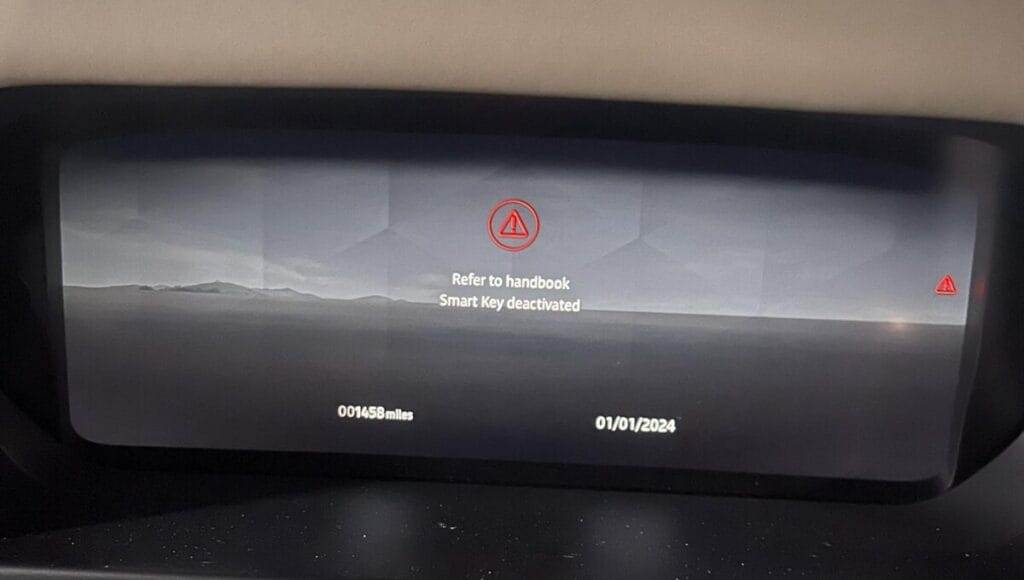
IIt’s a frustrating situation that’s becoming increasingly common: you walk up to your Range Rover, Defender, Velar or Discovery, press the start button, and see a message saying “Smart Key Deactivated”, “Key Not Recognised” or “Key Disconnected — Refer to Handbook”.
Your key worked perfectly yesterday. Now it won’t start the car at all — even when you hold it against the steering column backup position. What’s going on?
The good news is that in most cases, this isn’t a fault with your key or your vehicle. It’s actually a deliberate anti-theft security feature that Jaguar Land Rover built into all models from 2022 onwards. And in many situations, you can fix it yourself in under two minutes using your smartphone.
This guide explains exactly why it happens, how to reactivate your key, and what to do if the DIY fix doesn’t work.
Why Does “Smart Key Deactivated” Appear?
Jaguar Land Rover engineered this feature to protect your vehicle from a specific type of theft.
Here’s the scenario: imagine you accidentally leave your spare key inside the car — perhaps in the glovebox, centre console, or your partner’s handbag on the back seat. You then lock the vehicle from outside using your other key and walk away.
A thief who breaks into the car would normally be able to find that spare key and simply drive away. To prevent this, JLR vehicles automatically deactivate any key that’s left inside the cabin when the car is locked from outside.
The deactivated key will still unlock the doors, but it won’t start the engine. This stops opportunist thieves from making off with your car even if they find a key inside.
Common scenarios that trigger key deactivation:
- You accidentally left your spare key in the glovebox or centre console
- Your partner’s key was in their bag on the back seat when you locked the car
- You locked the car using the InControl app while a key was inside
- A valet or family member locked the car with a different key while yours was inside
- You have only one key and somehow the security system was triggered
The message can appear as:
- “Smart Key Deactivated”
- “Key Deactivated — Refer to Handbook”
- “Key Not Recognised”
- “Key Disconnected”
- “Smart Key Not Found”
Which Vehicles Are Affected?
This security feature affects all JLR vehicles from approximately 2022 onwards that use the newer style smart key system. This includes:
Range Rover Models:
- Range Rover (L460) — 2022 onwards
- Range Rover Sport (L461) — 2022 onwards
- Range Rover Velar — 2022 onwards with updated key system
- Range Rover Evoque — 2022 onwards with updated key system
Land Rover Models:
- Defender 90, 110, 130 — 2020 onwards
- Discovery — 2022 onwards with updated key system
- Discovery Sport — 2022 onwards with updated key system
Jaguar Models:
- F-Pace — 2022 onwards
- E-Pace — 2022 onwards
- I-Pace — 2022 onwards
- XF — 2022 onwards
If your vehicle is older than 2022 and you’re seeing “Smart Key Not Recognised”, the cause is more likely to be a flat key fob battery, a flat vehicle battery, or a module fault rather than the deactivation security feature. See our guide on what to do when your key fob battery dies.
How to Fix It: The InControl App Method
If you have an active subscription to the Land Rover InControl or Jaguar Remote app on your smartphone, you can usually reactivate your key in under two minutes. This is the quickest and easiest fix.
Step 1: Open the InControl Remote app (Land Rover) or Jaguar Remote app on your phone.
Step 2: Make sure your phone has a mobile data or WiFi connection.
Step 3: Use the app to lock your vehicle. Wait for confirmation that the lock command was received.
Step 4: Use the app to unlock your vehicle. Wait for confirmation.
Step 5: Repeat the lock/unlock cycle two more times (three times total).
Step 6: Try starting your vehicle with the previously deactivated key.
In most cases, the key will now be reactivated and will start the car normally.
Why does this work? The lock/unlock command from the app essentially tells the vehicle’s security system that an authorised user is present and in control. This resets the deactivation status of any keys that were previously disabled.
What If You Don’t Have the App?
If you don’t have the InControl/Jaguar Remote app installed, or your subscription has expired, or you’re in an area with no phone signal, you’ll need to try alternative methods.
Method 1: Use Your Second Key
If you have access to your spare key (the one that wasn’t deactivated), use it to:
- Unlock the vehicle
- Start the engine
- Drive the car for a few minutes
Once you’ve started and driven the vehicle with the working key, the deactivated key should automatically reactivate. Test it by stopping the engine and restarting with the previously deactivated key.
Method 2: Get Someone to Bring the Spare Key
If your only key has been deactivated and you’re stranded, you’ll need someone to bring your spare key to you. Once you start the vehicle with the spare key, your original key should reactivate.
This is one of the reasons we always recommend keeping your spare key at home or with a trusted person — not in the car.
Method 3: Download and Set Up the App
If you’re stranded but have phone signal, you can download the InControl or Jaguar Remote app and set it up on the spot. You’ll need:
- Your vehicle’s VIN number (visible through the windscreen or on your V5C document)
- Your JLR account login details (or create a new account)
- An active remote services subscription
Setting up the app can take 10-15 minutes, but it may save you a costly callout.
Method 4: Call a Professional
If none of the above methods work, or if you only have one key and it’s been deactivated with no way to reactivate it, you’ll need professional assistance. More on this below.
What If the App Fix Doesn’t Work?
In some cases, the lock/unlock method via the app doesn’t reactivate the key. This can happen if:
- The key’s transponder has become corrupted
- The Keyless Vehicle Module (KVM) has developed a fault
- There’s a software glitch requiring a dealer-level reset
- The key has been permanently erased from the system (rare)
If you’ve tried the app method multiple times and the key still won’t start the car, the issue has likely moved beyond a simple deactivation.
Try these additional steps:
- Remove the battery from the key fob for 30 seconds, then reinsert it
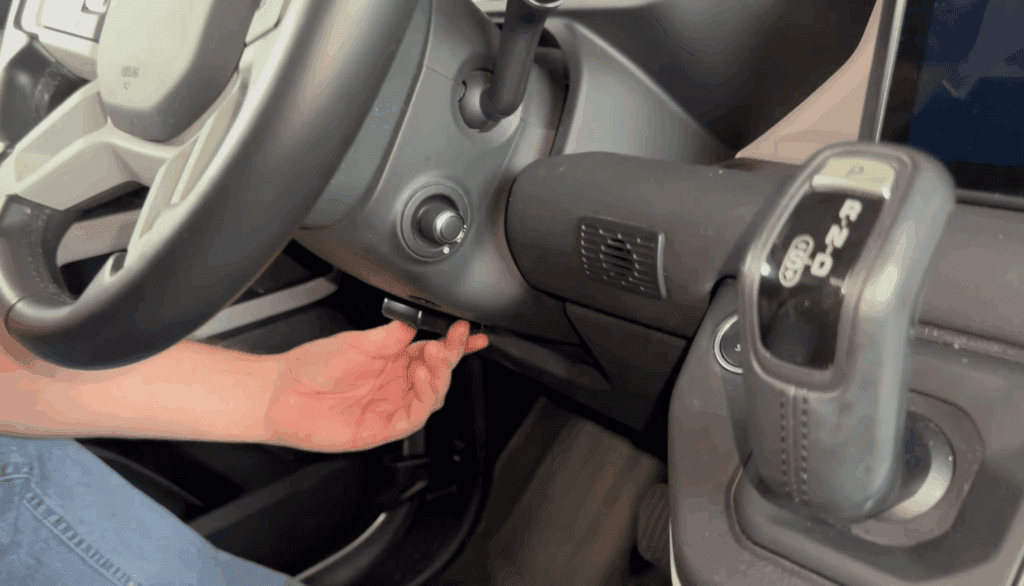
- Try the emergency start position — hold the key flat against the steering column (look for the key symbol markings) while pressing the start button
- Disconnect the vehicle’s 12V battery for 10 minutes, then reconnect and try again
- Try your spare key to confirm whether the issue is with the specific key or the vehicle
If the spare key works but the original doesn’t, the original key may need reprogramming or replacement.
If neither key works, there may be a fault with the vehicle’s KVM (Keyless Vehicle Module) or related electronics.
Understanding the Keyless Vehicle Module (KVM)
The KVM is the brain of your vehicle’s keyless entry and start system. It stores the encrypted codes for all programmed keys and communicates with the keys to verify their authenticity.
When the KVM develops a fault — which can happen due to software corruption, water ingress, or electrical issues — it can cause symptoms including:
- “Smart Key Deactivated” messages that won’t clear
- Keys that intermittently work and don’t work
- Inability to program new keys
- Complete failure of keyless entry
KVM faults require specialist JLR diagnostic equipment to diagnose and repair. In some cases, the KVM needs to be replaced and all keys reprogrammed to the new module.
Preventing Key Deactivation in Future
Once you’ve resolved the immediate problem, take these steps to avoid it happening again:
Never leave a spare key in the car. This is the number one cause of key deactivation. Keep your spare at home or with a trusted person.
Be careful with the InControl app. If you lock the car using the app while a key is inside (even if you’re inside too), that key can be deactivated.
Communicate with family members. If multiple people use the car with different keys, make sure everyone understands not to lock the car while another key is inside.
Keep the app installed and subscription active. The InControl/Jaguar Remote app is your fastest recovery method if deactivation happens again.
Store both keys separately. Don’t keep both keys on the same keyring or in the same bag.
When to Call a Professional
You should call a specialist if:
- The app lock/unlock method doesn’t reactivate your key
- You only have one key and it’s been deactivated with no way to fix it
- Neither of your keys will start the vehicle
- The deactivation message keeps appearing even after you’ve fixed it
- You’re stranded and need immediate assistance
- You suspect a KVM or module fault
At AutoKeyz, we provide mobile diagnostics and key programming for all Jaguar and Land Rover vehicles across Kent, London, Essex, Surrey, Sussex, Hampshire and Berkshire. We carry JLR-specific diagnostic equipment and can:
- Diagnose why your key was deactivated
- Reauthorise and reprogram keys to your vehicle
- Replace faulty KVM modules if required
- Supply and program new keys if yours is beyond repair
- Provide emergency callout for stranded customers
Our mobile service means we come to you — whether you’re stuck at home, in a car park, or at the roadside.
Quick Reference Summary
Seeing “Smart Key Deactivated” on your Range Rover, Defender or Jaguar? Here’s the quick fix:
- This is usually a security feature, not a fault
- It happens when a key is left inside and the car is locked from outside
- Quickest fix: Use the InControl/Jaguar Remote app to lock then unlock the car 3 times
- Alternative: Start the car with your spare key — this should reactivate the deactivated key
- No spare key? Download the app and set it up, or call a professional
- Prevention: Never leave a spare key inside the vehicle
Frequently Asked Questions
Why does my Range Rover say “Smart Key Deactivated”?
This is a security feature on 2022+ JLR vehicles. It activates when a key is left inside the car and the vehicle is locked from outside using a different key or the smartphone app. It’s designed to prevent thieves from driving away if they find a spare key inside your car.
How do I reactivate a deactivated smart key on my Land Rover?
The easiest method is to use the InControl Remote app on your smartphone. Lock the vehicle using the app, then unlock it, and repeat this three times. Your deactivated key should then work normally. Alternatively, start the car with your spare key and the deactivated key should reactivate.
Can I still unlock my car if the smart key is deactivated?
Yes. A deactivated key will usually still unlock the doors — it just won’t start the engine. This is by design, so you can retrieve items from the car.
What if I only have one key and it’s been deactivated?
If you only have one key and the app method doesn’t work, you’ll need professional assistance. A JLR specialist can reauthorise your key using dealer-level diagnostic equipment, or supply and program a new key if necessary.
Does the emergency start position work with a deactivated key?
Usually not. The emergency start position (holding the key against the steering column) is designed for when the key fob battery is dead. Key deactivation is a different issue — the car is deliberately refusing to recognise the key’s transponder, so the backup position typically won’t help.
Which JLR vehicles have the smart key deactivation feature?
This feature is present on most Jaguar and Land Rover vehicles from 2022 onwards, including Range Rover, Range Rover Sport, Defender, Discovery, Velar, Evoque, F-Pace, E-Pace, I-Pace and XF models with the updated smart key system.
How much does it cost to fix a deactivated key?
If the app method works, it’s free. If you need professional assistance to reprogram the key, expect to pay £150-£300 depending on the complexity. If the KVM module needs replacement, costs can be significantly higher (£800-£1,500+ including parts and programming).
Can a flat car battery cause the “Smart Key Deactivated” message?
A flat car battery is more likely to cause “Smart Key Not Found” or “Key Not Detected” messages. However, if the battery went flat while a key was inside and you then jump-started or charged it, the key could potentially be in a deactivated state. Try the app method to reactivate it.
Related Articles
Key Fob Dead? How to Unlock & Start Your Jaguar or Land Rover
JLR Key Fob Battery Replacement Guide — Jaguar & Land Rover
Range Rover Evoque Smart Key Not Detected — Causes & Fixes
Smart Key Not Recognised Jaguar XF After Battery Disconnect — How to Fix