Published: December 2025 | Reading time: 6 minutes | Author: AutoKeyz
It’s one of the most common calls we get: “My key fob isn’t working and I can’t get into my car.” Whether you’re in a supermarket car park, at the airport after a long trip, or stranded on your driveway, a dead key fob battery can leave you feeling helpless.
The good news is that every modern Jaguar and Land Rover has a backup system built in. You just need to know where to find the emergency key blade, where the hidden door lock is located, and how to start the engine using the emergency start feature.
This guide covers the complete process for all JLR models.
Step 1: Remove the Emergency Key Blade from Your Fob
Every JLR smart key contains a physical metal key blade hidden inside the fob. This blade is designed for exactly this situation.
To remove the emergency key blade from a Land Rover fob, look for a small button or sliding mechanism on the side of the key fob. Press or slide it to release the metal blade, then pull the blade straight out.
To remove the emergency key blade from a Jaguar fob, slide the chrome or silver cover at the end of the fob to reveal the blade. Pull the metal key straight out of the housing.
The blade is small but sturdy enough to unlock your door and help you access the vehicle.
Step 2: Find the Hidden Door Lock
Modern JLR vehicles don’t have a visible keyhole on the door handle — but there is one hidden underneath a cover. The location varies slightly by model.
Land Rover Models (Range Rover, Defender, Discovery, Evoque, Velar, Discovery Sport)
The emergency lock cylinder is hidden behind a small cover on the driver’s door handle.
To access it, insert the emergency key blade into the small slot or gap at the front edge of the door handle cover. Use the blade as a lever to gently pry off the plastic cover. This will expose the mechanical lock cylinder underneath.
Insert the key blade into the lock and turn counter-clockwise (anti-clockwise) to unlock the door.
Jaguar Models (F-Pace, E-Pace, I-Pace, XF, XE, F-Type)
On most Jaguar models, the lock cylinder is hidden behind a cover on the driver’s door handle or on the front passenger door handle depending on the model.
To access it, look for a small removable cover on the back portion of the door handle (the part closest to the car body). Use the key blade to carefully pry this cover off, revealing the lock cylinder.
Insert the blade and turn to unlock the door.
Step 3: Prepare for the Alarm
Important: When you unlock the door using the emergency key blade, the alarm will almost certainly go off. This is normal — the car doesn’t recognise that you’ve unlocked it with a legitimate key because the fob battery is dead and can’t send a signal.
Don’t panic. The alarm will stop once you complete the emergency start procedure in the next step.
Step 4: Start the Engine Using Emergency Start
Once inside the vehicle, you’ll see a message on the instrument cluster or infotainment screen saying something like “Smart Key Not Found” or “Key Not Detected — Position As Shown”.
This is where the emergency start backup feature comes in. Every JLR vehicle has a designated spot where you can hold the key fob so the car can read the passive transponder chip inside it — this chip doesn’t require battery power.
Land Rover Emergency Start Location
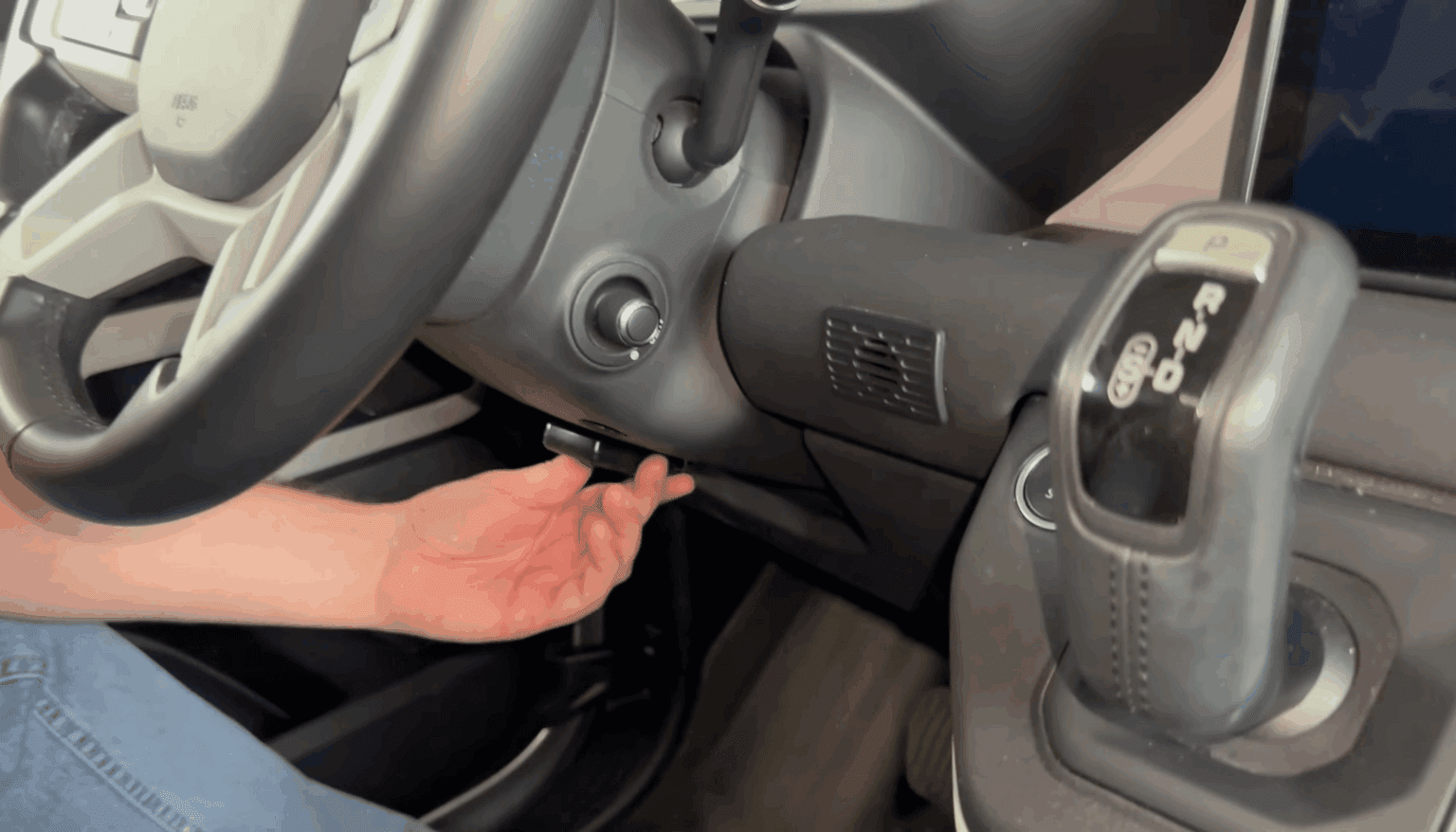
On Land Rover models, the emergency start position is on the side of the steering column.
Look for small markings or a key symbol on the left-hand side of the steering column cover, near your left knee. Hold the key fob flat against this marked position with the buttons facing outward.
To start the engine:
- Hold the key fob flat against the steering column in the marked position
- Keep the fob in place
- Press the brake pedal firmly
- Press the Start/Stop button
The car should recognise the transponder chip in the fob and allow the engine to start. The alarm will stop once the engine is running.
Jaguar Emergency Start Location
On Jaguar models, the emergency start position varies by model but is typically in one of these locations:
F-Pace, E-Pace, I-Pace: Hold the fob flat against the lower left side of the steering column where marked with a key symbol.
XF (X250/X260): Some models have a dedicated slot near the driver’s left knee, below the auxiliary switches. On others, hold the fob against the steering column.
XE: Hold the fob against the steering column on the left side.
XJ: Hold the fob flat against the fascia below the auxiliary switch pack (below the fog light switch).
To start the engine:
- Position the fob flat against the marked location (buttons facing outward)
- Keep the fob firmly in place
- Press the brake pedal
- Press the Start/Stop button
If it doesn’t work on the first attempt, try moving the fob slightly around the marked area while pressing the start button.
What If the Emergency Start Doesn’t Work?
If you’ve followed the steps above and the car still won’t start, try these troubleshooting tips.
Move the fob around the area. The exact position matters. Slide the fob slowly across the steering column area while pressing the start button. Some owners find the sweet spot is slightly higher or lower than the marked position.
Press harder. Make sure the fob is flat against the surface with good contact.
Try your second key fob. If you have access to your spare key (perhaps a family member can bring it), try that fob instead. The first fob’s transponder chip may be damaged, not just the battery.
Check if the fob battery is completely dead. If the battery has a tiny amount of charge left, the fob may be interfering with the emergency start. Remove the battery from the fob entirely, then try the emergency start again.
Check the vehicle battery. If the car’s main 12V battery is also flat (which can happen if the car has been sitting unused), no amount of fob positioning will help. You’ll need to jump-start or charge the vehicle battery first. See our guide on Discovery Sport key fob issues after a flat battery.
Once You’re Moving: Replace That Battery
The emergency start feature is exactly that — for emergencies only. Once you’ve got the car running, your priority should be replacing the key fob battery.
JLR key fobs use a CR2032 lithium coin cell battery. You can pick one up from any supermarket, petrol station, or hardware shop for a few pounds.
To replace the battery:
- Remove the emergency key blade from the fob
- Use the blade to pry apart the two halves of the fob case
- Note the battery orientation (positive side usually faces up)
- Remove the old battery and insert the new CR2032
- Snap the fob back together and reinsert the key blade
- Test by pressing the lock/unlock buttons
See our complete guide to JLR key fob battery replacement for detailed step-by-step instructions.
Tips to Avoid Getting Stranded
A dead key fob battery is preventable. Here’s how to avoid the situation in the future.
Don’t ignore the warning. When your dashboard displays “Smart Key Battery Low”, replace the battery within a few days. The warning typically gives you a few weeks of notice, but don’t push your luck.
Replace both fobs at the same time. If one battery is dead, the other is likely not far behind. Replace both to avoid a repeat situation.
Carry a spare CR2032. They’re tiny and cheap. Keep one in your wallet, glovebox, or bag.
Know where your emergency blade is. Before you need it, practise removing the blade from your fob so you’re not fumbling in a stressful situation.
Know where the door lock is. Find and identify the hidden lock cover on your door handle now, while you’re not panicking in a car park.
Keep your spare key accessible. Don’t store both keys together. Keep one at home or with a trusted person.
When to Call a Professional
The emergency key and start backup should get you going in most situations. However, you should call a professional if:
- The emergency start doesn’t work despite trying all positions
- The vehicle battery is also flat and you can’t jump-start it
- The emergency key blade won’t turn in the lock (the lock cylinder may be seized)
- You’ve lost all your keys and don’t have access to an emergency blade
- The fob still doesn’t work after replacing the battery
At AutoKeyz, we provide mobile locksmith services for Jaguar and Land Rover vehicles across Kent, London, Essex and the South East. We can diagnose key fob issues, supply and program replacement keys, and resolve lockout situations — all from our fully-equipped mobile workshop.
Quick Reference Summary
Locked out with a dead key fob? Here’s the quick version:
- Remove the emergency key blade from inside your fob (press the release button)
- Find the hidden lock on the driver’s door handle (pry off the small cover with the blade)
- Insert blade and turn counter-clockwise to unlock
- The alarm will sound — ignore it for now
- Get inside and hold the fob flat against the steering column (look for markings)
- While holding the fob in position, press the brake and press Start
- The engine will start and the alarm will stop
- Replace your key fob battery as soon as possible (CR2032)
Frequently Asked Questions
Where is the emergency key blade in my JLR key fob?
Every JLR smart key has a hidden metal blade inside. Look for a small release button or slider on the side of the fob. Press or slide it to release the blade, then pull it out.
Where is the door lock on a keyless entry Range Rover?
The lock cylinder is hidden behind a removable cover on the driver’s door handle. Use the emergency key blade to pry off the cover, then insert the blade into the exposed lock and turn counter-clockwise to unlock.
Will the alarm go off when I use the emergency key?
Yes. The car’s alarm will sound when you unlock with the blade key because the fob isn’t transmitting a signal. The alarm will stop once you complete the emergency start procedure and start the engine.
Where do I hold my key fob to start a Land Rover with a dead battery?
Hold the fob flat against the left side of the steering column, where there are usually markings showing the key position. Keep the fob in place, press the brake, and press the Start button.
What battery does a Jaguar or Land Rover key fob use?
All modern JLR key fobs use a CR2032 lithium coin cell battery, available from any supermarket or hardware shop.
Can I still drive if my key fob battery dies while driving?
Yes. Once the engine is running, a dead fob battery won’t stop you. The car will continue to run. However, you won’t be able to lock the car with the fob when you stop, and you’ll need to use emergency start to restart the engine.
Related Articles
JLR Key Fob Battery Replacement Guide — Jaguar & Land Rover
Discovery Sport Key Fob Not Working After Flat Battery — Causes & Fixes